



Steambox Officially Real, Dubbed ‘Steam Machines’ Coming Early 2014
Valve had three big announcements planned for this week,
...
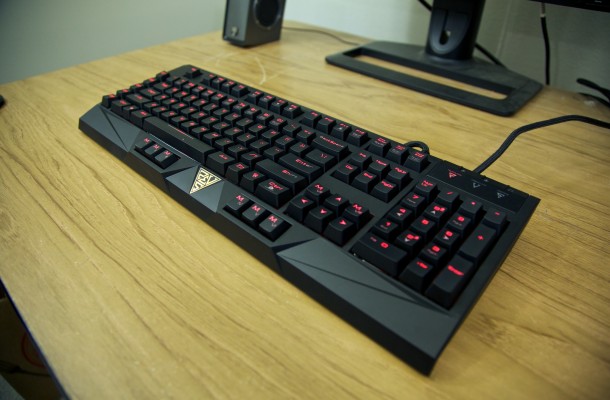
What’s up tech fans! Today we’re checking out the mechanical gaming keyboard Hermes from the folks over at Gamdias, a relative newcomer in the gaming peripherals market that formed back in 2012 with an emphasis on wanting to create high performance eSport worthy accessories for serious gamers.
The Hermes is a mechanical keyboard that, while a bit on the large side when combined with the wrist rest, is really aesthetically pleasing to the eye for those that want a darker theme, especially when using red and black. It makes the interesting choice of using Cherry MX Blue switches, normally more associated with typists due to their heavier resistance and loud clicking sound, as opposed to the Red switches more commonly used in gaming keyboards that are quieter and very low tension. In order to bring this choice of Blue MX more in line with what gamers are used to, Gamdias has made a modification to the normal design with what they call the “Gamdias Element”, basically additional plastic that reduces how loud the key presses are, as well as shortening the distance at which the key needs to be pressed. As a result, the keys feel a bit different from most other gaming keyboards, and while seeming a bit odd at first, feels like a comfortable balance between gaming and normal use as long as you don’t mind the clicky noise.

Now one of the first things you’ll notice if you pick this one up for yourself is how absolutely huge the wrist rest for this keyboard is; together they can easily take up a large portion of your desk space, and as a result can be troublesome for those that like a little open room on their workspace. Despite it’s size, the rest is really easy to set up thanks to a pair of magnets that help it snap in place easily, and while it is huge, this is a direct result of it’s additional use as a handy dust cover for when it’s not in use.

The Hermes features 13 different macro keys in 3 separate areas, 5 located in a column on the left hand side of the keyboard, a set of 6 keys divided into pairs of three located at the bottom easily within reach of thumbs resting on the space bar, and two surrounding the up arrow key. I really like this placement set up because it makes great use of normally empty space, and adds a lot of macro options without making the keyboard ridiculously bulky. You can also save up to 10 different macro profiles that can be switched between with the punch of two keys, allowing for 130 possible macro keys that can be quickly accessed in game. You can even record and set up macro keys on the fly with a surprising amount of ease, making impromptu programming an option when need be.

Aside from these features, the Hermes has plenty of more common features that are still handy, including the option to switch between 6 and n key rollover to avoid ghosting, a gaming mode option to disable the windows key, media control functions like pause/play, skip, and volume controls, and a number of key lighting options from off, low light, bright light, and pulsating. While you only need one USB port to hook up the keyboard, you also have the option to hook up an additional usb as well as an audio out and mic in cable, which then open up port options on the top right side of the keyboard for easy and quick setup of headsets or other accessories.

Gamdias currently offers one application to manage all of their peripherals, Hera, which isn’t the prettiest interface but gives a huge amount of control over macro customization; including options like timers, sound notifications for keys being pressed, or even setting up macros to send out sound recordings in the middle of online games. It has some other features too like statistics on your key presses, or comparing your performance to other users via the Olympics option for those that obsess over reviewing their own technique.


Overall, the Gamdias Hermes Keyboard is a solid design, whose only real downside is how comfortable the user is with the clicky factor of it’s blue switches as opposed to red switches most gamer’s are accustomed to. The MSRP of $139.99 is a bit on the high side for what you get, especially considering the relative young age of the name behind it, but it’s far from being outrageous. If you’re the type that doesn’t get bothered by key clicks (or just wear headphones too often to notice) and have the room on your desk to fit it, the Gamdias mechanical Hermes Keyboard strikes a good balance for everyday use and gaming thanks to a terrific macro layout and customizations options paired with an aesthetically pleasing dark tone. For those of you interested in picking it up for yourself, you can check out the Gamdias website here for a list of available retailers.



Valve had three big announcements planned for this week,
...
Water cooled, tightened up and ready to go. We are finally done...

All eyes are on Hawaii as AMD makes the
...

The GeForce GTX 760 Gets Unleashed Another week means yet another launch...

 UE says:
 ssj12 says:
 John smith says:
 Gclef101 says: