

ASUS PA249Q 24-inch AH-IPS Pro Monitor Review
By Elric Phares
Updated: July 1, 2013
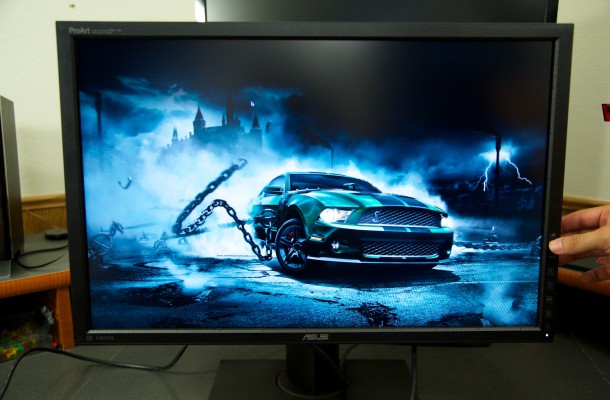
PA249Q Special Features
ASUS is known to pack tons of exclusive features into their products and the PA249Q is no exception to the rule. Special features though have become what sets products apart nowadays as most of the panels are made by the same manufactures making many models exact copies of the other albeit the housing and controls making features the separating choice between them.
I have and still own many ASUS monitors and I will not lie I am a fan of them. This is not saying that everyone is the absolute best in class, but many of them are top-notch products. This monitor as I have pounded out many a time in this review is geared for the artist or editor who needs the absolute most accurate color they can get and the features of this model reflect those users.
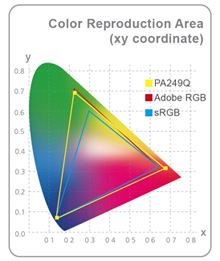
The PA249Q offers color reproduction at 99% of the Adobe RGB color space, which is a very high rate that is not matched by many monitors at this price level. What this means to you as the user is the colors seen in photos will be reproduced faithfully and consistently in a way that cannot otherwise be on monitors with just an sRGB color space.
The PA249Q also incorporates 10-bit color for smother gradations that allow the monitor to accurately show over one billion onscreen colors and support 12 bit internal lookup table (LUT), which gives smoother gradations and a more natural transition between hues. Another thing is the PA249Q comes pre-calibrated right out of the box, which guarantees industry-leading color accuracy, having been pre-calibrated to minimize the color difference to Delta E (∆E) of less than 3 – ensuring precise reading of color input and guarantees excellent color fidelity.
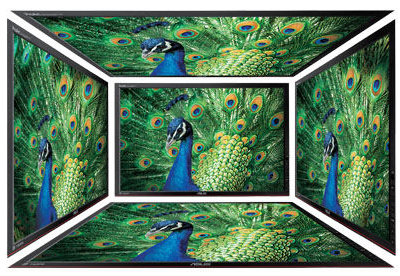
There are quite a few types of different IPS technologies floating around and there are differences in the level of technology involved with each one. The ASUS PA249Q uses an A-grade AH-IPS (Advanced High-Performance In-Plane Switching) display technology for superior color accuracy, a brighter image from increased backlight transmission and lower power consumption. Each PA249Q also features a brightness rated at 350cd/m² and an 80,000,000:1 ASUS Smart Contrast Ratio for enhanced image contrast.
The monitor also utilizes a 178° (H)/ 178° (V) ultra-wide viewing angles AH-IPS display that eliminates color shift from almost any direction making it great for using in situation where more than one person needs to view the screen like in a presentation type environment. Splendid Technology is something ASUS has been using with their monitors for many years now and the PA249Q come with 7 different factory presets for you to choose from. There are gaming, movie, standard and more along with 4 color temperature settings to totally control the work environment.

Some monitors I have worked with, HP being the worst do not even have OSD controls at all on the monitor itself and forces you to use your display driver GUI to make any changes and this something I feel is just totally a lame move on any monitor. ASUS however has though about this as well as seen by the 5-way navigation key that acts as a joystick that gives access to the QuickFit Virtual Scale function along with all OSD functions and settings.

The PA249Q also features two user-customizable shortcuts for frequently used monitor controls, removing the need to navigate the full on-screen menu system. ASUS exclusive innovations Picture-in-Picture (PIP) and Picture-by-Picture (PBP) allow users to view images from different signals in almost anyway they want. PIP and PBP let users view images from different signals and let them switch between the main and PIP source, including audio, easily.
When working with different pictures that need to be resized before printing ASUS feature a Quick Fit Virtual Scale Function that allows users to preview photos and documents on screen in their actual sizes prior to printing. It can activate via a hotkey on monitor and used as a guide to accurately view and edit photos. Additionally, the PA249Q also comes with a choice of seven different background colors for users to choose from. The ASUS PA249Q supports the following formats:
Document: A4

Letter

Photo: 8×10 & 5×7

4×6 & 3×5 & 2×2

Grid: Alignment

Centimeters

Inches

Continue Reading: PA249Q Box Content




-

-

-

Corsair Unveils New Gaming Headsets & Gaming Keyboard at PAX Prime 2013
Today at PAX Prime, Corsair is showing off a large
...
-

-

NVIDIA GeForce GTX 760 2GB Review Feat. MSI Twin Frozr Gaming Edition
Layout And Design Lets first take a look at NVIDIA’s reference model...
-

-
Malcolm says:
Nice!...
BEST PC & GAMING DEALS OF THE MONTH! (AUGUST 2013)
-
Josh says:
Would love to win!...
BEST PC & GAMING DEALS OF THE MONTH! (AUGUST 2013)
-
luis velez says:
I will stay whit my 2 GTX 780 not gona buy a ...
NVIDIA's GeForce GTX 790 & Titan Ultra Coming Soon?
-
Tifel Malti says:
Thank you Elric for all of your hard work...
BEST PC & GAMING DEALS OF THE MONTH! (AUGUST 2013)

You must be logged in to post a comment Login