


AMD R9 280X Crossfire Results & Benchmarks!
Last week we reviewed AMD's latest entry into the video card...

Gigabyte Features
Many cards ad the little sticker saying “Hey look at me I’m overclocked”, but how many really even touch upon anything outside the default clock speeds with more than just a little performance nudge?
Usually we see only the top tier companies making an effort to insure that their card is competitive beyond the reference design as it takes time and effort to improve upon someone else’s design.
Gigabyte has made quite the name for themselves via their Windforce cooling solution that allows for overclocking with the ability for the card to still run within the heat boundaries set by AMD.


The card is also part of the Ultra Durable line. The Ultra Durable VGA board provides dramatic cooling effect on lowering both GPU and memory temperature by doubling the copper inner layer of PCB.


The Gigabyte R9 280X features a single DVI connection, single HDMI and twin Mini Displayport outputs.

Overclocked with a Core clock of 1100MHz Gigabyte is attempting to gain the attention of the enthusiast level gamer, and with their aftermarket cooling this number can be moved up still a bit for even more performance. Messing with the voltage in conjunction with the cards ability to perform can achieve very good results as long as you do not go too crazy and fry the card so be careful when going all-out in your overclocking adventure.

Users can take advantage of OC GURU II software to monitor and overclock the card and although not the most popular of the software suites available it does give many of the options needed to achieve a stable overclock. The memory is clocked at 1500MHz, but there are a few others with this same clock speed on their card.

For users who want to experiment in the extreme the Gigabyte Windforce Edition card comes with two BIOS’s that you can switch between and re-flash as needed. This is perfect as you can use the primary BIOS as your overclocking and gaming settings, and secondary BIOS just for standard or light overclocking.

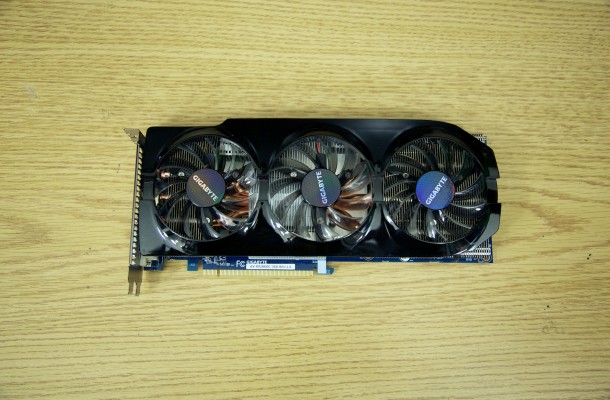
There are other settings that can be set within the Windows environment that will allow you to switch between various modes of operation with the AMD R9 280X. Gigabyte is still using a blue colored PCB, (Which Gigabyte I hate to tell you this, but most users prefer a black PCB) and on the front of the card we can see 3 fans that make up a part of the Windforce cooling. The cooling apparatus consists of aluminum heat-fins, heat-pipes and the 3-fans. You can customize how fast the fan speeds are, as well as the memory and core clock speeds, and if you want the voltages can be altered as well for complete control of the card.




Last week we reviewed AMD's latest entry into the video card...

Lookout gamers here it comes the next big weapon from NVIDIA...


Speeds and Feeds All variations of the new GeForce GTX 760 will...

 Mike Bellfield says:
 Adam Nazare says:
 Moinaldo says:
 Lucasino8 says: