


ASUS Transformer Book T100 Now Shipping with HDD Keyboard Dock
| ASUS today announced that the Transformer |


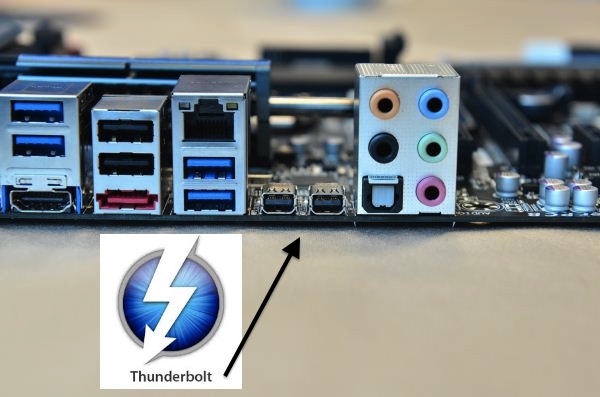
In the last year we have seen the rise of the “Thunderbolt” port as it has become more and more prevalent as time goes by due to its enormous flexibility and high-speed transfer rates. Already a mainstay in the Mac world this technology has been ever creeping into the PC arena.
As of now there are 100 devices shipping that support “Thunderbolt” and most are both PC and Mac certified so any user can take advantage of its benefits. Thunderbolt brings a whole new experience to the user and has many key features such as simultaneous data and display transfer, with speeds of up to 10Gbps, and daisy-chain connectivity of up to six devices.
Building upon that foundation, the first Thunderbolt 2 systems were introduced in October this year, with blazing speeds up to 20Gbps, and support for the latest DisplayPort 1.2 protocol. Thunderbolt is clearly the fastest, most versatile connection to your PC and with many devices being introduced all the time the variety and type of products is only getting better.
Intel wants you to have this technology in your PC and is taking steps to insure you can make the upgrade as simple and as painless as possible. Intel’s Dan Snyder has wrote up a little ditty explain how Intel plans on getting Thunderbolt onto your PC by way of interaction with various manufacturers in a new initiative called “Thunderbolt ready” So what is this new initiative and how does it work? “Thunderbolt ready” enables PC manufacturers to offer Thunderbolt upgradeable motherboards within desktop and workstation computers.
By using a Thunderbolt card, Thunderbolt’s blazing fast speed and uncompressed video capabilities can now be added to any motherboard that includes a GPIO header (general purpose input/output header), so even if your system doesn’t have Thunderbolt it is now possible to “upgrade” to it. Users that are interested in adding Thunderbolt 2 technology to an existing Thunderbolt ready system can combine a Thunderbolt card with a growing number of Thunderbolt enabled motherboards, all identified by the use of the “Thunderbolt ready” moniker. The Thunderbolt ready program makes it simple to identify which components work together to upgrade your PC with Thunderbolt 2 capabilities.

Adding a Thunderbolt card to a PC is very easy and requires no intense technical skills to install onto the motherboard. Everything you need comes withy the card including all the cables, software and instructions. Installation is very easy, all a user needs to do is connect the Thunderbolt card into the designated PCIe slot, connect a cable to the GPIO header, and utilize an available DP (DisplayPort) out connector from the motherboard processor graphics, or an external graphics card, depending on the system.
Obviously there are many benefits for the user that cannot be dismissed that are being offered by Thunderbolt technology and since more and more products are starting to support it, it seems to be the technological next-wave of the ever-immediate future. If you already own a Thunderbolt capable motherboard all you need to do is buy the card and follow the easy to follow instructions. Its quick, its easy and its painless. For the individual building a new system all you need to do is make sure your motherboard and card is Thunderbolt ready. Also the amount of motherboards that support this new technology is ever expanding so finding a proper board and capable card will only become easier as time roll on.
ASUS never one to be left out in the cold will be the first partner to join this new effort, and they have developed the first Thunderbolt card, the ASUS ThunderboltEX II*, to go along with the first Thunderbolt ready motherboard, the ASUS Z87 Pro*. The ThunderboltEX II is based on Thunderbolt 2 technology, and will be available in December 2013. ASUS is also planning for additional motherboards to be certified within the Thunderbolt ready program in 2014. ASUS ThunderboltEX II is the first expansion card certified by Intel as a Thunderbolt 2 upgrade solution — and it gives users a simple, fast and flexible option to upgrade their existing hardware whenever they want,” said Joe Hsieh, ASUS Corporate Vice President and General Manager of Motherboard and Desktop System Business Unit. “ASUS worked closely with Intel to ensure the best compatibility, quality and performance across ASUS 8-series Thunderbolt 2-ready motherboards.” The question of is there an add-in card for this has been answered and many other OEM’s should follow suite and join this cause in the name of Thunderbolt. As this technology becomes more and more prevalent it is good to know that Intel and others are making the transition a very simple process. Now Thunderbolt will be for the masses bringing 20Gbps bandwidth, data and display over a single cable, and daisy-chain connectivity of up to six devices, to a far larger range of users in the marketplace.
Source: Intel





| ASUS today announced that the Transformer |


Swiftech Announces New FlagShip Apogee XL CPU Waterblock. Long Beach, April 19,...


The GeForce GTX 760 Gets Unleashed Another week means yet another launch...

 jalebi Singh says:
 Justin Shepherd says: Justin Shepherd says:
 RUSTY DIXON says: