

140509_4people_728x90

AMD Mantle Peformance & Impressions: The Good, The Bad & The Ugly.

By
Updated: February 6, 2014
Mantle Thumbnail.001

As we reported earlier this week, AMD has finally released it’s Mantle API drivers in it’s latest Catalyst 14.1 drivers. 

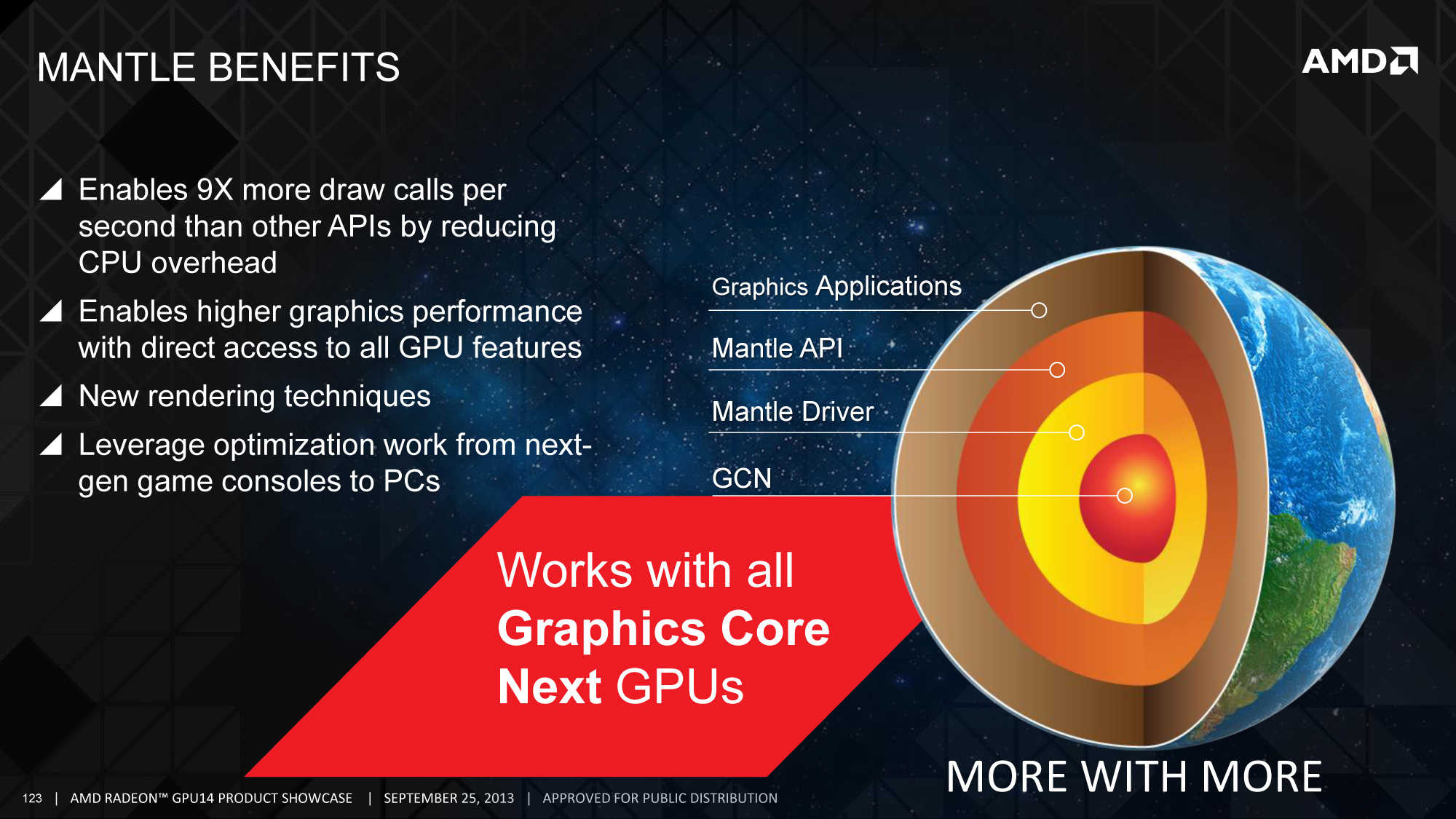
Since then we got a chance to test out Mantle and get a feel for what it does and how it performs. Currently Mantle is only available in Battlefield 4 and Star Swarm but we do expect more support in the near future. Before we jump into the testing, for those wondering what Mantle is, in simple terms, it’s an alternative GPU API like OpenGL and DirectX.

The initial perception was that because Mantle allows a much higher amount of draw calls per frame, resulting in a significant boost in GPU performance across all AMD video cards but the reality is that Mantle is geared to improve performance by reducing the workload on the CPU, so the result is that performance gains depend on how CPU heavy game is and should offer biggest improvements to users with entry to mid-level processors.
MantleBenefits

Below is the video results of are testing but for those reading, we’re using an Intel i7-4770K + Gigabyte R9 290X Windforce video card for these tests. We realize based off Mantle’s benefits of lower end CPUs, this isn’t the ideal test setup but as Mantle support becomes more apparent, we’ll be settings up an AMD based test bed for future testing.

Battlefield 4 Ultra Settings

  •  1440p Direct3D: 58.12 AVG FPS
  • 1440p Mantle: 61.87 AVG FPS
  • 1080p Direct3D: 86.76 AVG FPS
  • 1080p Mantle: 92.67 AVG FPS

Star Swarm Extreme Benchmark

  • Direct3D: 43.38 AVG FPS
  • Mantle: 61.76 AVG FPS

For those curious how we were able to benchmark Battlefield 4 since FRAPS does not work with Mantle, there’s actually a built in tool that will allow you to do so and HardOCP posted a walkthrough on how to do so.

When the game is launched simply press the tilde “~” key to open console then use the following command.

“PerfOverlay.FrameFileLogEnable 1″ to start saving frame times

“PerfOverlay.FrameFileLogEnable 0″ to stop

The resulting .csv file will be located in your User/Documents/Battlefield 4 directory. The file will contain Frame Time, CPU Frame Time, and GPU Frame Time in milliseconds. To calculate average fps for the run you divide the total number of frame entries in the log (which is total number of frames for the session) over the total amount of time.

Average FPS = (Total # of Frame Time Entries) ÷ (Σ (Total # of Frame Times in ms) ÷ 1000).

So initially you can see Mantle is off to a pretty impressive start overall. One negative story though that broke from ExtremeTech is that Mantle enabled in Battlefield 4 is causing foggy, washed out images. It’s noted that the error is on Dice’s end and not AMD’s but take a look at the pictures below.

So what do you guys think of Mantle so far? If you’ve been running the BETA drivers, let us know your setup and thoughts so far. As always, thanks for reading here on Tech of Tomorrow and stay tuned for more Mantle coverage!

 

  • WhiteSkyMage

    Just for those 20 FPS, no ty AMD. I better wait for Maxwell and get what I am looking for … 1440p + 3D + G-Sync and of course ShadowPlay and ultra quality gaming :) Decrease in quality and increase in FPS, no ty, why not increase in both?!

    • marclar

      Decrease in quality? What? In my point of view Nvidia is currently FUCKED. BIG TIME. AMD is going to destroy Nvidia if more and more devs incorporate Mantle. Few extra fps that mantle gives (10 15) is the difference between top notch card which costs about 500e and 250e card. So with mantle and 250e gpu you get the performance of a 500e gpu. Pretty neat eh?
      PS: I was Nvidia GPU user since i know for myself and my gtx 560 Ti died on me so in exchange (was still under warranty and it passed) they’ve given me 7870 and it’s games are running pretty good (of course faster than gtx 560 Ti since it’s a stronger GPU). OCing this beast i could get on par with gtx 580 or 670 with mantle i get the speed of 680 or 770. Those cards are way expencier for the same amount of FPS. You be the judge of which is better.
      In bf4 decrease in quality is a fuck up on DICE end and has nothing to do with mantle.
      I’m not a amd fanboy nor nvidia fan boy just stating what is currently better. Who knows maybe nvidia has something up their sleeves but the way i see it all games future games are gonna be GCN optimized because “next gen” (more like last gen) consoles both use amd GPUs which are GCN. :)
      Slowly but surely amd is catching up and taking the lead in GPU fight tho srsly slacking behind with CPU fight.

      • jeff chen

        You love to hear yourself talk…
        NVIDIA IS STILL KING FUCK YOU

        • WhiteSkyMage

          It might be true – Mantle has a big chance there, but look at Nvidia – G-Sync? Well, sorry but I am actually gonna choose the G-Sync rather than the tearing on screen and lag. AMD to go away and do something about their GPU and monitor sync.

          Also, I am with Nvidia mostly for their 3D vision. Yes it wants an enormous amount of performance, but in the end you are “in” the game :D

          • marclar

            You know you can buy 120Hz monitor and you will have natural “g-sync” with no lag and screen tearing… right? Yeah i’m myself very sensitive to input lag and screen tear but i learned to suck it up and sacrifice some screen tear for no input lag. If i had 120Hz monitor i wouldn’t even notice screen tear since monitor can keep up with given frames per second… :)
            If G-sync was about 30-50 euros i would totally see it feasible but man 200e for a G sync kit is a bit too damn overpriced.

          • WhiteSkyMage

            I know, Nvidia will drop the price later and that’s when i will get it. And I guess you would ask why later? Well 3D! Kepler to suck it, Ima get Maxwell! Until Maxwell comes out, Nvidia will solve the problem between G-Sync and 3D so they can run together and I won’t worry about getting SLI to achieve 60FPS min on 3D for no lag and no tear – I will be fine at 35~50 on 3D 120hz 1ms 1440p monitor with G-sync (oh yeah that still doesn’t exist but it will by the end of this year). Man I am simply waiting for 2 times more powerful gpus than Kepler – Maxwell, A monitor which will be 3D with higher resolution than 1080p and of course – X99 chipset which will hold 8-core cpus and DDR4 RAM.

          • marclar

            as much as all that sounds dandy thing is u still need 60 fps per eye ball to run it smooth otherwise you’ll suffer bad imagery because of low fps. It’s 60 fps per eye for a reason it doesn’t have anything to do with tearing and lag. Nvidia already dropped prices on their GPUs i don’t think they will go any further. They have to think this one through otherwise they’ll lose the lead…. AMD controls consoles… Devs will create games and optimize them for GCN gpu since that’s what consoles run now. Games will run pretty smooth on amd gpus and if nvidia doesn’t think of something soon they might fall behind i must say… (i was nvidia user since i know for myself as i’ve mentioned and i love nvidia but amd is trading some pretty devastating blows right now…)

          • WhiteSkyMage

            When you say 60FPS per eye you are a bit confusing…So that means I need to run the game at 60 FPS? That would really be a requirement for SLI on 1440p resolution, so yeah i am a bit concerned for it…

          • marclar

            No that means you need to be running the game at 120 FPS hence all this fuzz about 120 Hz or 144 Hz monitors that are “fully 3D ready”. You can game with 30 fps per eye that would require game to run 60 fps steady. 3D tech is all weird with steady fps requirements… But if the game is unoptimized for certain gpus no matter how powerful gpu u have u will always have crappy fps. That’s why im concerned about Nvidia since 90% of games will be console made and ported to PC and they will be GCN optimized automatically since consoles use GCN gpus. Nvidia needs to get their shit together and throw in a punch so we can get even more goodies due to monopol fight :D

          • WhiteSkyMage

            Optimized or not, 120 FPS will be just a hell on earth to reach in all 3D games… ACiv BF is about 35-40 with current GTX 780Ti, so whatever OC I do, even with 2 cards, 120FPS won’t be achievable….
            Also, what if I have 70 or 80 FPS which drop at certain scenes of the game? I mean, you can’t always have it steady… Nvidia needs to release Maxwell 3 times stronger than Kepler… No wonder why 3D is kept at 1080p – it’s hard to reach the performance required to power 3D on higher resolutions.

          • marclar

            It’s because AC 4 is not very well optimized. My gtx 560 Ti runs it at 35 40 fps all maxed out and even has headroom for more fps but the game wont force the gpu to work. Also i don’t get it why it aint pushing my cpu as well it hangs at around 60 – 70% and as far as i remember AC 4 engine is multi thread friendly and should make my procesor work atleast 85%+ that way my gpu would be maximized and get more fps. (tho my gtx 560 Ti died recently and in exchange as i’ve mentioned got 7870.)

          • Adam Keller

            Oh by the way playing games or even watching videos above 30 fps can cause headaches over periods of time unless the game devs also code in blurs which will decrease your quality, just though I should share that, its the reason consoles and cell phones have limited fps

          • marclar

            not at all. That fact is a complete and total bullshit. Do you get headaches by looking at someone move in real life? No? their movement is fluent because we see way more than 25 FPS. Don’t be an idiot. Consoles and cell phones have limited fps because they CANNOT produce more fps. They literally CANNOT. They’re even struggling to pull 30 fps as it is. Same goes to cell phones.

        • marclar

          Perhaps it still is… but if things move like they move now… Soon nvidia wont be the king…. lol

          • Elijah Daugherty

            That is a broad statement.
            There is really no evidence to back that.

            Also, there never was a king.

  • Zookkz

    I’d rather see the performance differences for a not so high end computer. Like a 3570k with an r9 270x? And maybe 8 to 12gb of ram only.

    • Cousin of The Rock

      5-10 fps, since it’s not optimised yet.

    • marclar

      Well you won’t see much because gpu is bottle necking… Tho i’m sure mantle will help my configuration with Q8400 @ 3.5ghz and 7870. My cpu is bottle necking like crazy and with mantle i might get a good amount of FPS boost since it’s off loading work from CPU to GPU. 3570k is still low high end tech man. 3570k OCed to about 4.5k eats any game today and will probably future games 3 years from now even more.

      • Zookkz

        How would a R9 270X be bottlenecking a 3570k?

        • marclar

          Because R9 270X GPU is not strong enough. R9 270x is a medium end GPU and can’t process fast enough. Why are you even in question of this? Why would 3570K bottleneck r9 270x?

          • Zookkz

            That wouldn’t bottleneck it lol. Regardless it would be nice to see what mantle can do on a mid-budget kind of system…for example a 3570k and R9 270X lol.

          • marclar

            well it can give a few fps increase like 4 to 5 but nothing major since 270x will run 99% all the time and there’s not much u can do when a gpu is fully utilized just some minor upgrades like how it’s processing xD Tho real perfo you’d see when a CPU bottlenecked system uses mantle… like my CPU Q8400 3.5 ghz clock… i’ve got 7870 and it’s being bottlenecked by my CPU and i can’t wait to check bf4 out how much perfo i’ll get when they update the fix…

  • Yosvany Blanco

    I get some pretty terrible frame skips when I run mantle on my 7850 and although I haven’t checked the fps I’m almost positive I have a drop in fps as well. I usually run 50-60 fps mantle definitely dropped me down 10 frames or so. Not sure if it has something to do with my 8350 CPU.

  • tobagganski343

    Until it makes a bigger difference, I’m sticking with Nvidia for now. ShadowPlay is too good to give up. We’ll see what the future brings

  • charley machicote

    would love two buy $ flow is dry great job AMD

  • chris

    I jumped from 30-40 fps on DX11 to about 70-90 constant with no stuttering or any real issues when selecting mantle on bf4 with my 8350FX and 2x7870s. Ultra settings 1080p it deff helped my crossfire situation and its one point that maybe needs to be looked into more. and honestly your retarded if you dont think 7-10 fps isnt a huge increase on a high end system. when your system is at that point you spend like 200+ dollars to try to get an increase like that and this is a free upgrade thats not even optimized yet. I did however notice Mantle made BF4 lot more blurry and the colors seemed less saturated. but it could be a Dice issues instead of mantle.

  • dancho

    I have a 7870 and phenom ii x2 550BE unlocked to quad core 3.1, will i get any performance improvements on battlefield 4 ?

    • hackleech

      at the moment i think not

  • Elijah Daugherty

    This doesn’t make me want to upgrade.
    It will be cool for those people who run low specs and want to play BF. But if you’re a serious pc gamer and want to play other games smoothly (non mantle games). Mantle doesn’t seem to benefit.

    I’m excited for maxwell. The arm chip will decrease cpu overhead in every game; without the extra development time.

    • Serpent of Darkness

      You don’t want to upgrade right now because, Beta 14.1 isn’t optimized, on the Mantle side, for CrossfireX. Basically, BF4 and Starswarm won’t run properly unless it’s only running the API with 1 Graphic Card. So yes, you’re only going to get 10 to 15 more FPS with a single AMD graphic card. Is that a reason to upgrade. The answer is no, but this is only for the moment because, AMD will optimize AMD Mantle with CrossfireX. When AMD Mantle gets optimized for CrossfireX end, you may be persuade to think otherwise because the gains will probably be another 10 to 15 fps more than with 1 graphic Card (for a total of 20 to 30 FPS more), at the least. Also, in addition, people don’t realize is that Maxwell will be like “AMD Mantle” on a hardware. Not just for the unified memory array, but the fact that the ARM core on the Graphic Card will redirect instructions to that core instead of your system’s CPU. You’re right when you say it will decrease CPU Overhead because that’s the issue. The CPU Bottleneck is the issue at a single core. On the other hand, AMD will come out with Seattle (the counter to Project Denver) for up coming R9-300, R9-400, and so on. So it’s really not going to be a major difference between NVidia and AMD. The only thing is that AMD has an API that approaches Project Denver on the CPU overhead part on a software level. Seattle will supplement that for AMD on a hardware level as well… If AMD uses cores similar to APIs, Project Seattle will probably push some serious performance boost. TegraK40 would probably be nice as well, but it’s NVidia’s first… So AMD has that experience factor in the fabricating and implementing of their own wannabe SoC APUs…

  • Serpent of Darkness

    When Starswarm first came out:
    D3D11.0 avg = 11.0 FPS.
    Mantle Avg = 50.5 FPS.
    Take into account, this benchmark was taken before there was an update on the StarSwarms “Game Engine,” a days after it’s vanilla release went live. Shortly after, there was an update that went live. These numbers were recorded before the update went live.
    System Specs:
    i7 4960x @ 4.6 GHz unparked.
    1 of 3 MSI R9-290x @ stock frequencies.
    65.5 GBs Ram at 1333. Mhz.

  • Mohammad Faramarzian

    Hi there, i gotta disagree with you on the render quality. i work in the game industry (cant say where) for 4 years now. the difference is the calculation method is different, so you get different result but its not really clear even in side by side comparison. for example zoom in to the text etched under the gun sight and compare that there is a difference there but not better or worse. and the overall difference there is in those photos is lighting and that is all.

    • Elijah Daugherty

      Things in the distance are foggy too. Overall mantle looks slightly worse.

      • Mohammad Faramarzian

        As you can see the mountains in the mantle image a further away. And environmental fog in 3d is based on distance

  • Lolzcat1234 .

    mantle is not good so nvidia should bring glide back to life