

140509_4people_728x90

Razer Unleashes New Razer Blade with 14″ QHD+ Display & GTX 870M GPU

By
Updated: March 13, 2014
36254_1_razer_introduces_new_blade_gaming_notebook_with_14_qhd_and_gtx_870m

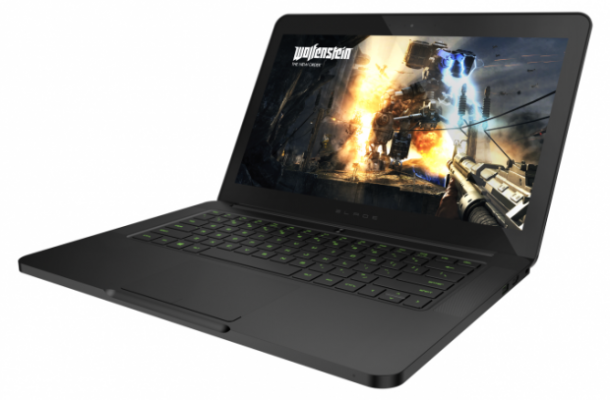
The Razer Blade has been an impressive machine these last couple of years. The last two versions packed a decent Nvidia GeForce GT 555M GPU into a thin and svelte body. All though this was great and all, it had one glaring error: the display. It was okay, but for such a high price point, you’d expect something a bit better. So, Razer has set out to fix this critical mistake.

The freshly-debuted Razer Blade for 2014 highlights an insane 14-inch 3,200×1,800 resolution (QHD+) touch screen. This all comes with a similar design as before powered by a Core i7 chip, Nvidia GeForce 870M, and 8GB of DDR3 memory. But an increase to such a high resolution would definitely need some powerful processing power backing it up.

Luckily, the 870M has 3GB of dedicated GGDR5 VRAM, along with the system’s standard 8GBs. As a result, the Blade can run drive the QHD+ display smoothly, but can also handle gaming at this native resolution. Software-wise, it runs Windows 8.1, which may upset some of you out there who swear by Windows 7. Razer has also reintroduced the Switchblade UI and second screen touchpad.

)

Oddly enough, the new 17-inch model, dubbed the Blade Pro, sticks to a standard 1080p non-touch display. Both the 14-inch and 17-inch models are ditching HDDs for good and going all in with SSDs. They start at a paltry 128GB (paltry for gamers, at least), and go up to 256 and 512GB. To compliment the speed boosts than SSD provides, Razer has also thrown in support of 802.11ac Wi-Fi.

What really has been setting the Blade apart from other competing gaming laptops has been the design, and the new Blade is no exception. It has a clean look and feel while maintaining a super thin profile. The green and black accents deliver a sleek look and are a neat touch. Let’s hope Haswell will deliver some stellar battery life here to give this notebook a serious edge over the competition.

The Razer Blade is now available for preorder with shipments expected to arrive in the next couple of weeks. Prices start at $2,199 and $2,299 for the Pro. I honestly couldn’t justify getting the Pro with its boring 1080p screen over the standard blade boasting a lively QHD+ panel. But, what do you guys think? Is that QHD+ awesome, or what? Let us know!

Source: Razer 
  • mrwalk

    hmm, I would get the MSI GS60 Ghost over this, GS60 is probably lighter than this as well lol

  • Black

    Weak,overpriced garbage. The 870m has nowhere near enough power to run games at the screens native res and when you turn the res down the image will become blurry garbage.

    • Daniel Chong-Kazuki

      we won’t know until reviewers get an actual product to test on. the new maxwell-based mobile gpus look really promising.

    • Ethan

      No, you can run a resolution thats non-native as long as it is a multiple of your native. And it just so happens that 3200×1800 is double 1600×900. I would assume an 870m could kick some ass on 1600×900, which by the way is plenty for a 14″ screen.

      • Al

        My 770m runs most games at 1080p high settings 60 fps with game, the 870m quite faster so 1080p won’t be an issue for it.

        • Cameron Lerch

          An 870M is not faster than a 770, if anything it’s probably around the 750 area.

          • Al

            I didn’t say a 770.

  • Puppet H

    this will suck, 1080p will look crap on it due to that mega high reso. it would eat the shit out of the gpu, even 3GBs will suck at this 2x 1600×900 resolution. oh and its 14′ inch, do they know how crap webpages and fonts will look?? They look so freaking small, nvm let me save my time for something useful. Go home Razer Blade, you’ve been involved in an accident after being drunk. No disrespect if you’ve actually been in one, or lost a relative to one, I know I have.

    • Hasan Zhang

      like the switch from ipad 2 to 3 the resolution is much higher but things didnt turn tiny. you can always scale you know. Text will look amazing but images on some sites might be a problem but when was the last time images really bothered you when looking at a ipad 3 +

      • Guest

        I realized the mistake when I purchased an ASUS N56DP with 1080p display 15′ inch , apart from its Matte display which is colourful, webpages scaled to 100% look too small, I always have to scale it to my liking making the fonts super annoying and trying to play games at 768 resolution really makes everything too huge with no sharpness in detail even with DX11 settings at max.

    • Derp

      Running at 1600×900 (which is a common multiple so it is possible and wont look like shit) will work just fine in games. Its actually a pretty decent laptop considering its super thin, has good battery life, and an 870M which should do fine for a 900P game for a few years. I’m not so sure if this warrants a $2k price tag, but meh. Some gamers like wasting money, so whatevs.

      • Guest

        the problem is that its running at twice 1600×900 at 3200 x 1800, Toshiba released a 15 inch 4k laptop and everything looks crap I do agree with what your saying

        • Cameron Lerch

          You will be running games at 1600×900, not 3200×1800, which the 870M will be able to do easily.

  • Suman Sresta

    do a giveaway

  • EricG

    the thing that confuse me is that aorus come with dual gtx765M and this new laptop with 800M series GPU. Which one is faster?

    • Ethan

      765M x2 is probably going to be faster, but only depending on what screen resolution you’re running

  • Jamie01604

    i cant afford any of these gaming systems i have a £60 computer and my only wish
    is to have a gaming computer :((